Jumat, 17 Maret 2006

Know more about the configuration switches of your Linux kernel

Unlike in FreeBSD and other Unices, compiling a kernel in Linux is relatively a challenging experience. For instance, the last time I decided to recompile the Linux kernel, I was faced with taking decisions regarding whether to enable or disable a functionality at the time of configuring it. Just doing a ...
# make menuconfig
... will throw up scores of configuration options which may or may not be useful depending upon the type of machine used and how the user intends to use it. And what about when you want to compare the differences between two different versions of a kernel ? It would be nice to have a web interface where you can browse through the various configuration options of all the kernel versions and even get an idea of what each option accomplishes.

Well, Jason Wies maintains a website called kernel.xc.net which covers this niche area. This site has a clean interface which helps the user to compare the configurations of different versions of the Linux kernel. While on this site, you can check what are the new features provided by any of the Linux kernel versions as well as know more about a particular configuration parameter.

I found the search feature really useful. For example, to find out the kernel configuration options related to APM (Advanced Power Management), all I had to do was type in the word "APM" in the search box, select the kernel version and my machine architecture and press OK. And I was provided a list of all the places in the configuration related to APM. What is more, I get to know what APM stands for and a short help on the particular configuration parameter. And if you know more about a configuration, you can enter it in the message box on the page and communicate it to the author. All in all a very useful site for any one looking forward to compiling ones Linux kernel.

Rabu, 15 Maret 2006

Humor: Six relations between Sex and Linux

linux and sex
I have a friend who acts like a Luddite. Now don't get me wrong, he is aware of technology, just that he is not passionate about it and bears with it just to get his job done. In the past, I have tried many times and failed miserably in inciting interest in him for technology. However, despite these contrasts, we are good friends and what makes our friendship gel is his obvious knack of looking at the lighter side of things.
Read more »

Selasa, 14 Maret 2006

IPCop - The perfect Linux firewall

An expert once said, using Linux without a firewall in place is akin to having unprotected sex. You never know when your system will be compromised. That doesn't mean that Linux is devoid of any firewall software. For one you have the ubiquitous iptables which is installed by default on all Linux machines (albeit with an open policy). So to make your machine secure, some amount of work has to be done. I had described the basics of configuring iptables in previous articles namely - "iptables - The poor man's robust firewall for Linux" (Click here) and "Designing a firewall using Iptables for the Home User" (Click here).

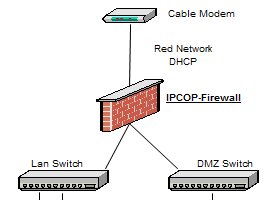
But there are other firewalls too available for Linux and one such firewall software is IPCop. What is unique about IPCop is that it acts as a standalone solution tailor made for the enterprise networks. What is more, it provides much more features than the basic iptables/ ipchains firewall implementation and can easily be extended to include other features through add-ons.

Joseph Guarino has written a two part series which simplifies the installation and configuration of IPCop firewall software which should be quite informative for any one in the business of Linux security. In the first part of the series, he walks one through the installation of the software and in the second part, he dwells on the more advanced topics like setting up a firewall using IPCop for mail and web servers, installing a very useful add-on called copfilter to enhance the firewall setup and more. The interesting thing is, once you have installed the firewall software, the configuration can be done using a easily accessible web interface which endows this software a great degree of userfriendliness.

Kamis, 09 Maret 2006

An interview with Jon Maddog Hall

Jon Maddog Hall is one of the strong proponents of the Open Source movement. He is currently the Executive Director of Linux International, a non-profit association of groups, corporations and others that work towards the promotion of growth of the Linux operating system and the Linux community. He also serves on the board of several companies and non-profit organizations like USENIX.

At some point of time in his life, he has worked as a software engineer, systems administrator, product manager, marketing manager and professional educator. In the past, he has worked for reputed companies like Western Electric Corporation, Bell Laboratories, Digital Equipment Corporation and VA Linux. Not withstanding his name, people who had the honor of interacting with him on a personal level vouch on his pleasant nature.

Recently, Dahna McConnachie quizzed him on his life, the work he is doing, as well as his opinion on issues related to Linux and the open source movement, which makes an interesting read.

To those wondering how he landed himself the infamous name of Maddog ;) , Jon attributes it to those times when he had less control over his temper.

Minggu, 05 Maret 2006

A Six-headed, Six-user Linux system

Linux is a multi-tasking, multi-user operating system. Which means, more than one person can use the OS at the same time each running multiple applications simultaneously. And the number of applications that can be run by each user is only limited by the hardware on which Linux is installed. One area where this feature of Linux is put to good use is in the thin client technology, where there is a sufficiently powerful master server which hosts the Linux OS and there are multiple stripped down versions of a PC which contains just the motherboard with enough memory, a graphics card, network card and no hard disk. These stripped down versions of the PC, also called dumb terminals, get their display from the master server and all the processing is also done on the master server.

Now if you are setting this up in a very small area, you can further cut costs by doing away with the individual mother board and memory by connecting the input and output devices directly to the master server. This is exactly what Bob Smith - an electronics hobbyist and Linux programmer - and his team accomplished. He set up a Linux system which allowed upto six people to use it at the same time. He used standard USB keyboards and mice and the six monitors were connected to individual PCI graphics cards. A very good feat indeed.

Now that doesn't mean he hadn't run into problems. He claims the system is a bit unstable in that he was getting a kernel oops when ever a user logged out. Nevertheless a very good project which can find uses in small cybercafes or even homes where you have a need for more than one computer but is hard put to buy a new one. For further details, you may read the original article.

What is a kernel oops ?
An oops report is basically just the dumping of information by the kernel when it enocounters a serious problem. The problem can be a code related bug such as dereferencing a NULL pointer, accessing out of bounds memory, and so on. Or it could be because of faulty hardware. The oops report is generated by the kernel to help the end user debug, locate, and fix the problem. Some times when a oops occurs, the system may seem to continue running normally, but is likely to be in an unstable state.

Sabtu, 04 Maret 2006

A comparison of Solaris, Linux and FreeBSD Kernels

As a Linux user, I am sure you have come across the saying - Linux is just the kernel - and that all the tools (command line or otherwise) that come with it are bundled with it to make it the user friendly OS that it is . But what about other POSIX OSes like FreeBSD and Solaris ? Well, they are said to have the kernel and the command line tools more integrated with each other. But the difference doesn't end there. There are big differences in their respective kernels and how they accomplish a task.

Max Bruning
has written a very good article which throws light on the differences (or rather the comparisons) of the kernels of these three OSes. He examines the three subsystems namely sheduling, memory management and file system architecture.

He arrives at the conclusion that kernel visibility and debugging tools play an important role in understanding the system better. Tools which help one to understand the kernel code are even more invaluable than just having access to the source code alone. On this note, he feels Solaris has a distinct advantage over Linux and FreeBSD because it comes with tools like kmdb, mdb and DTrace which help a developer to analyze the code better.

Kamis, 02 Maret 2006

eGovernance and Free Software : An event hosted by the United Nations University

Today I was rather surprised to get an invitation via email to attend a panel named 'eGovernance and Free Software' which is being hosted on 16th March 2006 by the United Nations University. The first reaction I had was that someone was pulling a fast one on me. But after visiting their website, I realised that there is indeed a university sponsored by United Nations and it enjoys a yearly grant of $40.7 million. And it also employs 211 staff from over 30 countries. The charter of this university is to contribute to the efforts to resolve the pressing global problems of member countries through research and by training personel.

The panel will concentrate on the area of how to achieve technological self determination by developing countries especially in the area of opensource software. The panel will research through discussion why it is in the best interests of the developing world to become an active participant of the opensource movement by contributing their efforts in further development of the products.

The function is being held in New York and a series of distinguished personalities like Mr. Michael Tiemann who is the Vice President at Red Hat are set to take part in the panel. So if you are living in and around New York or will be in the city on 16th of March 2006, and are interested in the opensource movement, then you may drop by at United Nations Headquarters building in conference room 6 and take part in the event.

But to attend the event, you have to first register at their website.