Senin, 31 Juli 2006

Book Review: Unix to Linux Porting - A Comprehensive Reference

In this age of numerous flavours of Unix and Linux OSes, it is imperative that applications are developed to work on a vast majority of them. But historically, Unix had been fractured, with each flavour of Unix - be it IBM AIX, Sun Solaris or HP-UX implementing its own libraries and system calls. And it would have been a nightmare to port an application running on one Unix flavor to another. But things started to brighten up a little when most of these Unices as well as Linux decided to embrace the standards set forth by the standards bodies such as ISO and POSIX.

May that be, it is still a bit difficult to port Unix applications to Linux and vice versa because the applications that are to be ported might be using non-standard APIs. And the team porting applications from one Unix flavour to Linux or vice versa should be aware of the system calls and other features of both Unix and Linux. For instance, the system calls made by each of these OSes - IBM AIX, Solaris, HP-UX or Linux - even though have a lot of similarities do have their own differences. And some system calls in one OS may not have an equivalent one in the other.

The book titled Unix to Linux Porting - A comprehensive reference, co-authored by Alfredo Mednoza, Chakarat Skawratananond and Artis Walker and published by Prentice Hall is a book which aims to be a capacious guide for developers who are into porting Unix applications to Linux.

Ironically, there are only 7 chapters but these chapters and the succeeding appendices make up over 700 pages which make this book rather voluminous.

The task of porting applications from one OS to another can be split up into 4 broad phases which are Scoping, Analysis, the actual Porting and finally the Testing and debugging phase. This book covers each of the 4 steps in a detailed manner dedicating separate chapters for each of them.

In fact the porting phase is further split up into 3 chapters for each of the three Unices - Solaris, IBM AIX and HP-UX. And in each case the respective authors have started from the rudimentary steps like setting up the porting system, explaining the differences in language specification, the compiler flags as well as the various tools like the linker, debugger and make in the respective OSes.

This book contains tables of all/most of the system calls in the respective Unix operating system and their equivalents in GNU/Linux and a short explanation of what the particular system call does.

The final chapter titled "Testing and Debugging" explains the use of tools such as GNU debugger, the use of strace and ltrace to pin point problems in the programs ported to Linux, memory optimizing tools such as electric fence, mpatrol and valgrind among others in detail.

But I found that the appendices - and these are as big and as many as the chapters themselves - have a lot of additional information which includes Solaris, IBM AIX and HP-UX to Linux reference tables, the porting issues faced when porting Unix applications to Linux to be run in Mainframes and so on. I really liked the appendix titled "Solaris to Linux Migration : A Guide for System Administrators" which lists the commands used in Solaris and their equivalents in Linux.

This book is definitely one of a kind and is an invaluable reference for anybody who is interested in porting Unix applications - and there are a whole lot of them - to work naively in Linux. But even those who are not into porting would benefit from this book as it provides insights into the system calls made by the OSes and the similarities and differences in their implementation.

Considering the complexity of the subject, it is not surprising that it took three people who are experts in their respective fields to come together to write this book. Alfredo Mendosa is an IT specialist in the Solution Enablement Group within the IBM Systems and Technology Division and is an expert on thread management and software algorithms. Chakarat Skawratananond holds a PhD and is a technical consultant in the IBM eServer Solutions Enablement Organization providing technical assistance to software vendors porting applications to IBM POWER systems running AIX and Linux. And Artis Walker is a consultant in the IBM Solutions Development Group and has published numerous tutorials and articles on migration and performance tuning for AIX and DB2. He is also the main author of several articles highlighting open-source solutions for AIX and Linux on the IBM POWER platform.

Chapters at a glance
  1. Porting Project Considerations
  2. Scoping
  3. Analysis
  4. Porting Solaris Applications
  5. Porting AIX Applications
  6. Porting HP-UX Applications
  7. Testing and Debugging
  8. Appendix A : Solaris to Linux Reference Tables
  9. Appendix B : AIX to Linux Reference Tables
  10. Appendix C : HP-UX to Linux Reference Tables
  11. Appendix D : Linux on POWER
  12. Appendix E : gprof helper
  13. Appendix F : Porting issues specific to IBM zSeries Mainframes
  14. Appendix G : Solaris to Linux Migration: A Guide for System Administrators
Book Specifications
Name : Unix to Linux Porting - A Comprehensive Reference
ISBN No : 0-13-187109-9
Authors : Alfredo Mendoza, Chakarat Skawratananond, Atris Walker
Publisher : Prentice Hall
No of Pages : 700
Price : Check at Amazon.com
Rating : Very good


Sabtu, 29 Juli 2006

The case of some Flash based games unable to display text when viewed in GNU/Linux

One persistent problem I used to face while using GNU/Linux was when I visited sites containing certain flash based games. The games played well but they never displayed the text embedded in it. I thought that it was a drawback of the flash player ver 7 provided for Linux. It never occurred to me to dig into the problem and find why it was happening so.

But recently, in the process of installing a software package, I installed all the core Microsoft fonts on my machine running Linux. In Ubuntu/Debian, there is a package called msttcorefonts which bundles all the most common true type Windows fonts. You can also copy the fonts from your Windows partition to Linux if you are dual booting between the two OSes. Once the fonts were installed, I was pleasantly surprised to see the above mentioned problem disappear.

That was when it struck me that perhaps the flash game in question could be using a Windows specific font to render the text in the game. And since there are no Windows fonts on a default Linux installation, the flash game/site is unable to show the text.

Fig: The game viewed on a system devoid of Windows fonts


Fig: ...and after the Windows fonts were installed.

So the next time you visit a flash site and can't see any text, be sure that it is because you don't have Windows fonts on your machine running Linux.

Rabu, 26 Juli 2006

Beginner's Guide to Motherboard Selection

There was a time when installing Linux on one's machine was a chore and involved opening up the case and collecting information about the various hardware components attached to the motherboard such as finding what chipset was used in a particular PCI card.

I remember having to open the case and check the chipset used in my internal dial-up winmodem to get it to work in Linux. And I am happy that it was hard because most of my knowledge in hardware was gained in the process of trying to get many of the devices to work in Linux. And I concede I failed a number of times but each time I tried to install Linux and get it to work on my machine, I learned a bit more about my system.

Now a days, installing Linux has become child's play. Almost all the devices are detected out of the box and if at all you need to open up the case, it will be for upgrading or to troubleshoot any hardware problems. But it always helps to have some understanding about the various parts which constitute a motherboard as well as be aware of certain inherent drawbacks that certain mother board designs have. This comes in use at the time of purchasing a computer and will help in buying one with the most suitable and efficient motherboard design.

Fig: Motherboard features (Courtesy: Toms Hardware)

Thomas Soderstrom at Toms Hardware has written an excellent article which explains the process of motherboard selection. He starts with the motherboard component overview and goes on to explain the layout considerations, choosing the right foam factor, the different socket types used by different processors as well as the bios features. This article is replete with images of the motherboard and the socket types. It is no doubt an indepth article and a must read for anybody interested in knowing more about ones computer.

Selasa, 25 Juli 2006

Kubuntu 6.06 LTS - An excellent Linux distribution based on KDE

At the time of the official release of Ubuntu Dapper Drake, I happened to visit the site of Kubuntu - the alter identity of Ubuntu. And on an impulse, I ordered a CD of the latest Kubuntu 6.06 LTS which was also released more or less at the same time as Ubuntu Dapper Drake but with a lot less fan fare. I forgot all about it till a couple of days back, when I received the single CD I ordered enclosed in a beautifully designed blue CD case.

This is one aspect of Ubuntu/Kubuntu I really like. They send you the CDs free of cost and they ship it to any place in the world and I believe this has helped in a large way in catapulting Ubuntu as the most popular Linux distribution.

Fig: Kubuntu desktop featuring KDE 3.5.2

By the time I received the Kubuntu CD, I was very excited and raring to check out what Kubuntu had in store for the Linux users. I found that there is a great level of overlap between Kubuntu and Ubuntu in that the way it boots up is the same for both the distributions. And Kubuntu also uses the same installer bundled with the Ubuntu live CD which makes it possible to install Kubuntu in a mere six steps. More over, all the Kubuntu specific packages are in the same archives as that of Ubuntu.

The end result is that an Ubuntu user can install all the Kubuntu specific packages by running the following command:
$ sudo apt-get install kubuntu-desktop
... and vice versa.

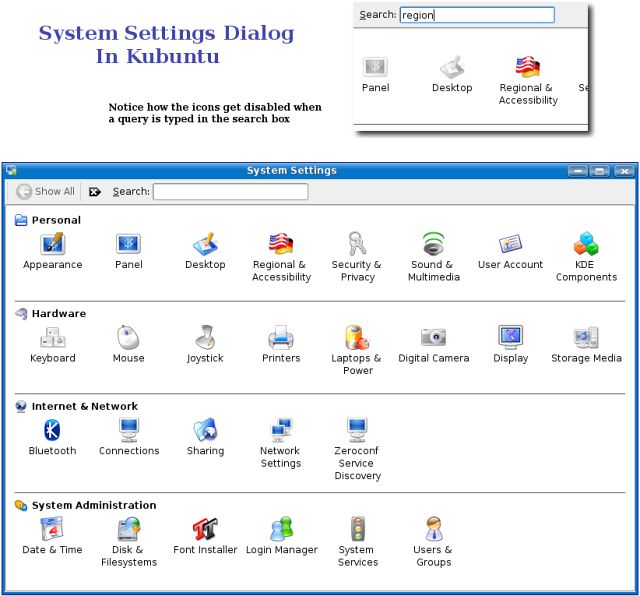
Kubuntu 6.06 has KDE 3.5.2 which is the latest version of KDE and so comes with its own set of improvements. One of the most noteworthy is the system settings dialog. In the earlier versions of KDE, the system settings which includes configuring hardware, desktop and any other thing related to KDE had their own separate dialog which made it rather confusing to navigate. In the KDE that is bundled with Kubuntu, all the configuration settings can be accessed from a single location which is the system settings dialog - Windows users will find it similar to the Control Panel but much more intuitive.

Fig: System settings dialog is much more intutive

Another thing which I found exciting was the inclusion of search as you type feature in each of the windows - be it the file manager or the system settings. And one has to just type the query string and the files matching the query will be selected in real time.

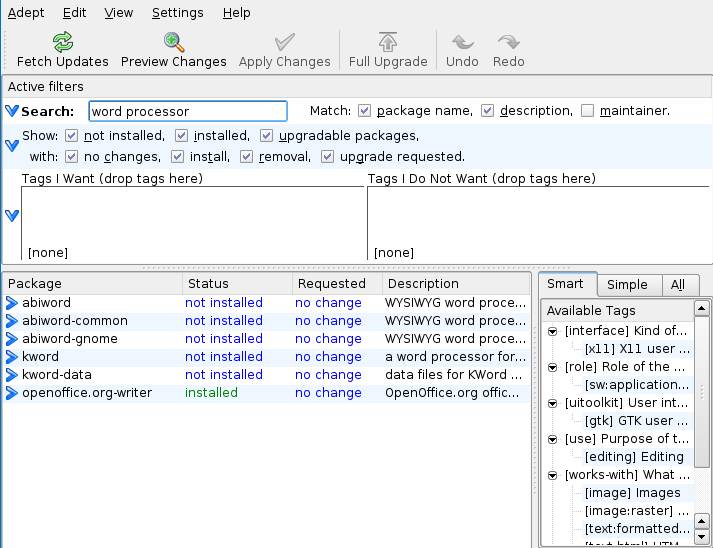
And to install additional programs, Kubuntu comes bundled with Adept - the installation manager similar to Synaptic found in Ubuntu. Here too, there is a search box and one has to just start typing and the results will be filtered as you type. I found this software to contain additional features such as tree view and advanced search with more options which made it a better option than synaptic.

Fig: Adept package manager in Kubuntu

KIO Slaves
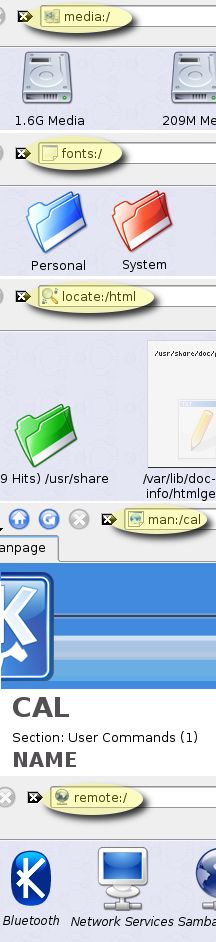
Of course, the one feature I really like in KDE and which is a prominent reason to use Kubuntu is the KIO slaves. What this translates for the end user is ease of use and lesser dependence on the shell. KIO slaves (KDE Input/Output Slaves) are programs that provide support for individual protocols. For example, I can view a man page, locate files on the system, ftp to a remote location, browse through any windows shares on my network, ssh to a remote machine and much more from within the file manager konquorer which by the way also acts as a web browser. Some of the useful KIO slaves which I found interesting are as follows:
  • man:/command - This will show the man page of the command in Konquorer in a nicely formatted manner.
  • locate:/query - Locate files which match the query and show it in Konquorer. Under the hood, the protocol uses the locate command.
  • ftp://ftp.anothermachine.com - Will ftp to the remote machine and display the files in the location. If the username and password are required, it will ask for it.
  • fonts:/system - See all the system fonts. But the users can also view the per user fonts by navigating to fonts:/user
  • settings:/ - This will show all the system configuration links such as hardware configuration, display settings, desktop settings and so on.
  • fish:/ - allows one to access another computer's files using the SEcure Shell protocol. The remote computer needs to be running SSH daemon.
    Eg: fish://username@hostname[:portnumber]
Fig: A subset of KIO Slaves put to use in Kubuntu

All the commands are to be entered in the address bar of Konquorer. But I found that some of them also work in file open dialogs or the run command box and so on in KDE. The above list is only a small subset of the entire KIO slaves supported in KDE. The last time I looked, KDE supports nearly 50 different KIO slaves which includes one for tar, gzip and bzip2 archives.

Kubuntu is no doubt a very polished distribution bundled with the latest version of KDE. Unfortunately, it has till now been overshadowed by its big brother Ubuntu to a large extent. But when KDE releases version 4.0 some time next year, I am sure it will gain more popularity than it now has and hence claim its rightful share in the lime light.

Senin, 24 Juli 2006

AMD acquires ATI - What is in it for Linux ?

All the news sites and news television channels are agog with the news of AMD acquiring ATI - one of the foremost graphics card manufacturing firms which rivals Nvidia. In the future, when one buys a PC with an AMD chipset, there is a good chance that it will have on-board graphics as powerful or even more than the graphics cards sold by ATI. This means that we need not have to buy a separate Graphics card to meet our gaming needs. It might be an all in one solution. This is no doubt good news for the computer users in general.

What is in it for GNU/Linux ?
At present, the situation on the Linux front is that to play any OpenGL games or run a program which uses OpenGL to render its user interface - such as Blender, it is very much needed to use the proprietary graphics drivers provided by either of the two graphics cards giants - Nvidia and ATI (Now a part of AMD). Yes Linux has an open source version of the drivers for the ATI/Nvidia graphics cards but they are found to be severely lacking and fail to tap the full power of the graphics card. And suppose you do install the proprietary driver, if you so much as install a newer version of the Linux kernel, then there is a good chance that the propritery driver may not be suited and so one will have to fall back to the open source version of the drivers. This has happened to me a couple of times in the past.

So the question in every Linux user's mind is will AMD open source the graphics card drivers ? We can only keep our fingers crossed in this matter and hope for the best. But all the sound bites emanating from various news sites point in the negative direction.

Now I wonder when Intel will acquire Nvidia.... this is what is needed to heat up the war over the domination of the PC chip market.

Sabtu, 22 Juli 2006

A list of companies selling computers pre-installed with Linux

There was a time when it was practically impossible to buy a computer with GNU/Linux pre installed. If you wanted to run Linux, you had to install it yourselves. Almost all PC manufacturers were shipping PCs with Windows OS. And if the buyer did not want Windows, he still had to pay the full price of the machine which included the cost of Windows OS.

But with Linux getting more user friendly as well as its improved out of the box support for various hardware devices, more and more people are opting to run GNU/Linux and its market share is increasing at a steady albeit glacial rate.

In my country for instance, it is possible to buy an assembled computer with Linux installed - something which was not possible or very rare a couple of years back. But the most significant aspect is that Acer, the Taiwanese PC manufacturer is selling its range of laptops with Linux pre installed and a Linux laptop from Acer is significantly cheaper than its Windows Laptop of the same make.

Lxer has a very interesting post which lists all the companies which offer PCs with Linux pre installed which could be useful for anyone interested in buying a Linux laptop or desktop.

Selasa, 18 Juli 2006

Realising the true value of Freedom

Anybody who keep an eye on the happenings around the world would know by now that the Indian Government, in its drive to curtail and restrict anti-national elements from playing havoc have passed orders to all ISPs in the country to ban 22 sites which post volatile material and spread hatred. This comes in the aftermath of the dreadful bomb attack on a couple of suburban trains in Mumbai - the financial capital of India, which led to 100s of innocent people dying and many more getting injured. My heart goes out to the kith and kin who lost their loved ones.

The ISPs in their national zeal have taken the easy way out (according to a report in today's edition of a leading newspaper) and block whole domains. And blogspot.com, the domain which hosts this site is also included. The end result is, no body inside India can access this or any of the blocked sites directly.

And the fact that I cannot view my own blog brought some discomfort to me initially. But I love my country and if blocking a blog domain will restrict the anti-national elements from using it to communicate with each other and stop the spread of terror, then I am all for it and I am willing to put up with the discomfort. After all, the existence of a blog or a site pales when compared to the threat posed to the lives of innocent people.

But this situation set me thinking. Generally, people are not aware of the value of their freedom and take it for granted. It is only when some adverse situation arises and the powers that be decide to restrict the rights enjoyed by us that we start missing them and then we realise how much that particular freedom meant for us.

For example, people in the US of A enjoy a wide degree of freedom. But how many of them really value their freedom ? I guess not many because they take it for granted. It is only when they are on the verge of losing some of their freedom that they become aware of the significant part it plays in their lives.

Similarly, people in China are born and brought up in a society where the government has placed various restrictions. The Chinese will find it normal to live in their country because they have not enjoyed the freedom in the first place and so, will not be aware of what they are missing.

It is only when you enjoy a right and then that right is suddenly taken away from you that you start to realise how much it contributes to your well being.

On a similar vein, many people who use free software including GNU/Linux take it for granted and do not even think twice about supporting the software they enjoy using. But suppose tomorrow, the rule of law passes a decree that using GPLed free software is against the law and prohibits the sharing of free software including GNU/Linux distributions. This is when people who use GNU/Linux and free software will find out how much they have gained from this movement and then, people will start to realise the true meaning of the word 'Free' in 'Free Software' and associate it with the word 'Freedom'. Until then, a major section of people using free software will be more concerned about the price factor.

Update (July 21st 2006): With the blanket ban on blogging domains making news world wide and casting a shadow on the government, an official directive was sent to all ISPs to lift the blanket ban on the blogging domains. But the ban on the 22 or so sites will remain. So now all in India can access blogspot.com domains. This is surely democracy at work. I doubt this would have been possible in a more restrictive society. On another note, I believe we can learn something from this whole affair. That is one should not take ones freedom for granted. Rather, each one of us have a duty towards the society we live in which earns us the right of freedom.