Rabu, 08 Februari 2006

A collection of books, howtos and documentation on GNU/Linux for offline use

If I am asked which is one of the most important strengths of GNU/Linux, then I would tell you that it is the documentation. That is right! What makes GNU/Linux such a pleasure to use is the excellent documentation that is included with it for each and every tool bundled with it. Just try learning to use iptables without reading the documentation even once, and you will get the idea. The documentation in Linux is available in a variety of formats - as man pages, info, HTML pages, postscript and in some cases even pdf. These documents are so good that many a times when I have asked questions in the past in various forums and Linux chat rooms, I have often got the now popular RTFM reply which means Read The Fine Manual.

But not many people are aware that you can have additional documentation and even whole books available locally for making your GNU/Linux experience that much richer. Here are a few of them that have come to my notice.

Note: In each of the cases below, I have given the package name (in bold and blue color) and you have to first install them using the apt-get command if you are using Debian Linux, which means you run the command:
# apt-get install <package name>
Apt documentation
  • apt-doc - A detailed documentation on apt package management.
  • apt-howto - A HOW-TO on the popular subject of apt package management.
  • apt-dpkg-ref - This is a apt dpkg quick reference sheet which forms a handy reference for those who find difficult to memorize the commands.
Bash documentation
  • bash-doc - The complete documentation for bash in info format.
  • absguide - This is an advanced bash scripting guide which explores the art of shell scripting. It serves as a textbook, a manual for self-study, and a reference and source of knowledge on shell scripting techniques. The exercises and heavily-commented examples invite active reader participation, under the premise that the only way to really learn scripting is to write scripts.
Books on Debian
  • debian-installer-manual - This package contains the Debian installation manual, in a variety of languages. It also includes the installation HOWTO, and a variety of developer documentation for the Debian Installer.This is the right documentation to read if you are thinking of installing Debian on your machine.
  • debian-reference - This book covers many aspects of system administration through shell command examples. The book is hosted online at qref.sourceforge.net but by installing this package, you get to read the whole book offline.
HOW-TOs and FAQs
  • doc-linux-text and doc-linux-nonfree-html - Any long time Linux user will know that in the past the HOW-TOs and FAQs formed the life line of anybody hoping to install and configure Linux on their machine. This was especially true when the machine had some obscure hardware. These packages download all the HOW-TOs and FAQs hosted on the tldp.org site and make available for offline use.
  • linux-doc - This package makes available the Linux kernel documentation. Might come handy if you intend to compile a kernel yourself or you want to dig deep into understanding the working of the kernel.
PC Hardware
  • hwb - This is a hardware book which contains miscellaneous technical information about computers and other electronic devices. Among other things, you will find the pin out to most common and uncommon connectors available as well as information about how to build cables.
Linux books
  • rutebook - Rute's Exposition is one of the finest books available for any aspiring and even established Linux user. It is actually a book available on print but the author has released it online for free. You may read this book online too but by downloading this package, you get to read the book offline. (I highly recommend reading this book by anyone interested in using Linux).
  • grokking-the-gimp - Linux has a top class graphics suite in Gimp. I have been using gimp to manipulate images published on this site as well as for other uses. This book which is also available online, covers all the aspects of working with Gimp in detail, all the while giving excellent practical examples interspersed with images. You may install this package if you wish to read the whole book offline. It is a 24 MB download though.
Now that you know which all packages to download and install, you are faced with the big question. That is how does one find in which all places the files are installed ? That is simple; just use the following dpkg command to find the files for a particular package:
$ dpkg -L <package name>
Selasa, 07 Februari 2006

Setting up a Mail Server on a GNU/Linux system

Have you ever wondered how you can convert your Linux machine into a mail server ? A person who wants to set up a mail server is faced with choosing from a variety of mail server software like sendmail, postfix and qmail. But setting up a Linux mail server is not about just installing this software - the real job is the configuration part where you need to know which options to enable and which to leave disabled. And of course, there are the collection of software which aid the mail server to do its job in a secure,safe and efficient way by providing additional features like on-the-fly virus checking, database integration, spam filtering, providing a user friendly web based client for checking mail as well as cryptographic support.

Faced with all this work, you wish how nice it would be to have a step by step documentation to implement a mail server in Linux from start to finish, right ?

Then look no further because Ivar Abrahamsen has written a lucid step-by-step tutorial on implementing a mail server on GNU/Linux which even a newbie can understand. He has used Postfix as the mail server, Courier IMAP, MySQL, Spam assassin for spam filtering, virus checking using ClamAV and provided Squirrel mail as the web based mail client. A very good reference for people faced with the task of implementing a mail server in Linux.

Senin, 06 Februari 2006

Upgrading to Firefox 1.5 in Ubuntu Linux

I have a few OSes installed on my machine. But Ubuntu is the main distribution I use to do most of my work and Ubuntu breezy has included the web browser firefox 1.0.7 with it. One grouse I have about Ubuntu is the quality of the Firefox web browser bundled with it. I am not talking about the version number. But using firefox in Ubuntu has been a real bad experience. The browser is such a memory hog that at times, it has crashed on me when I am in the middle of sending an email. Also it doesn't render the fonts properly for certain web pages.
So I decided to find ways to upgrade the web browser to the latest version 1.5.Unfortunately, the Ubuntu repository doesn't yet have the latest build of this web browser and I had to search for other ways to upgrade the web browser.
That was when I came across this walk through at wiki.ubuntu.com . The basic steps outlined there for upgrading to Firefox 1.5 in Ubuntu breezy are as follows :
  • Install libstdc++5 library. Ubuntu breezy has a later version (6.0) of this library and firefox 1.5 requires the earlier version.
  • Download the firefox 1.5 package from the official Firefox website and unpack it into the /opt directory. (Usually this is all that is required to get firefox 1.5 running). But for greater integration with other programs as well as importing your bookmarks from the earlier version of the web browser, some additional work has to be done.
  • Link to your plug-ins
  • Rename your old profile in your home directory leaving it as a backup.
  • To ensure that firefox 1.5 is the default browser, modify the symbolic link using the dpkg-divert command.
Now you have the latest version of firefox for Ubuntu. For people using other Linux distributions, after unpacking the firefox into the /opt directory, you may include the path in your $PATH variable. Earlier when I was using Fedora, I used to unpack any software I want in the /opt directory and then include the path to the directory containing the binary in my .bashrc file.

Minggu, 05 Februari 2006

Book Review: Linux Patch management - Keeping Linux systems up to date

Any system or network administrator will know the importance of applying patches to the various software running on their servers be it the numerous bug fixes or upgrades. Now when you are maintaining just a single machine, this is really a simple affair of downloading the patches and applying them on your machine. But what happens when you are managing multiple servers and hundreds of client machines? How do you keep all these machines under your control up to date with the latest bug fixes? Obviously, it is a waste of time and bandwidth to individually download all the patches and security fixes for each machine. This is where this book named "Linux Patch Management - Keeping Linux systems up to date" authored by Michael Jang gains significance. This book released under the Bruce Perens' open source series aims to address the topic of patch management in detail.


The book is divided into seven detailed chapters, each covering a specific topic related to patch management. In the first chapter, the author starts the narration by giving an introduction to the basic patch concepts, the various distribution specific tools available for the user including Red Hat up2date agent, SUSE YaST online update, Debian apt-get and also community based sources like those in Fedora. What I found interesting was instead of just listing the various avenues that the user has regarding patching his system, the author goes the extra mile to stress the need for maintaining a local patch management server and also the need to support multiple repositories on it.

The second chapter deals exclusively with patch management on Red Hat and Fedora based Linux machines. Here the author walks the readers through creating a local Fedora repository. Maintaining a repository locally is not about just downloading all the packages to a directory on your local machine and hosting that directory on the network. You have to deal with a lot of issues here, like the hardware requirements, the kind of partition arrangement to make, what space to allocate to each partition, whether you need a proxy server and more. In this chapter, the author throws light on all these aspects in the process of creating the repositories. I really liked the section where the author describes in detail the steps needed to configure a Red Hat network proxy server.

The third chapter of this book namely SUSE's Update Systems and rsync mirrors describes in detail how one can manage patches with YaST. What is up2date for Red Hat is YaST for SuSE. And around 34 pages have been exclusively allocated for explaining each and every aspect of updating SuSE Linux using various methods like YaST Online Update and using rsync to configure a YaST patch management mirror for your LAN. But the highlight of this chapter is the explanation of Novell's unique way of managing the life cycle of Linux systems which goes by the name ZENworks Linux Management (ZLM). Even though the author does not go into the details of ZLM, he gives a fair idea about this new topic including accomplishing such basic tasks as installing the ZLM server, configuring the web interface, adding clients ... so on and so forth.

Ask any Debian user what he feels is the most important and useful feature of this OS, then in 90 percent of the cases, you will get the answer that it is Debian's contribution to a superior package management. The fourth chapter takes an in depth look into the working of apt. Usually a Debian user is exposed to just a few of the apt tools. In this chapter though, the author explains all the tools bundled with apt which makes this chapter a ready reference for any person managing Debian based system(s).

If the fourth chapter concentrated on apt for Debian systems, the next chapter explores how the same apt package management utility could be used to maintain Red Hat based Linux distributions.

One of the biggest complaints of users of Red Hat based Linux distributions a few years back was a lack of a robust package management tool in the same league as apt. To address this need, a group of developers created an alternative called YUM. The last two chapters of this book explores how one can use YUM to keep the system up to date as well as hosting ones own YUM repository on the LAN.

Chapters at a glance
  1. Patch Management Systems
  2. Consolidating Patches on a Red Hat/Fedora Network
  3. SUSE's Update Systems and rsync Mirrors
  4. Making apt Work for You
  5. Configuring apt for RPM Distributions
  6. Configuring a yum Client
  7. Setting up a yum Repository
Meet the author
Michael Jang has specialized in networks and operating systems. He has written books on four Linux certifications and one of them on RHCE is very popular among students attempting to get Red Hat certified. He also holds a number of certifications such as RHCE, SAIR Linux Certified Professional, CompTIA Linux+ Professional and MCP.

Book Specifications
Name : Linux Patch Management - Keeping Linux Systems Up To Date
Author : Michael Jang
Publisher : Prentice Hall
Price : Check at Amazon.com
No of pages : 270
Additional Info : Includes 45 days Free access to Safari Online edition of this book
Ratings: 4 stars out of 5

Things I like about this book
  • Each chapter of the book explores a particular tool to achieve patch management in Linux and the author gives in depth explanation of the usage of the tool.
  • All Linux users irrespective of which Linux distribution they use will find this book very useful to host their own local repositories because the author covers all distribution specific tools barring Gentoo in this book.
  • The book is peppered with lots of examples and walk throughs which makes this an all in one reference on the subject of Linux patch management.
  • I especially liked the chapter on apt package management which explored many useful commands which are seldom used or known by the greater percentage of people.
Update: This review has been carried on slashdot.org. You can read the comments there.

Jumat, 03 Februari 2006

PC-BSD : A user friendly BSD flavour geared for the desktop

If you ask me how many variants of Unixes are there, then my obvious answer would be quite a few. Some of them being IRIX, IBM AIX, Sun Solaris, HP-UX, Sco Unix and of course the BSD variants - FreeBSD, NetBSD and OpenBSD.

But over the years, a relatively recent upstart called Linux has been successful in stealing the thunder from all the above Unix variants. Mainly because Unix has a history of being newbie unfriendly. It also helped that the GNU movement caught on the public's fancy and Linux being released under GPL made it unbeatable vis-a-vis the price. One of the most talked about drawback of Unix is that it is very hard to install by a relative neophyte. But recently interest has been generated in making at least some of the Unix variants more user friendly and many projects have come up which aim to create a better experience for the end user both in installing and using them.

One such project is PC-BSD. As the name indicates, it is a BSD variant and is based on FreeBSD. The aim of the developers of PC-BSD is to make it more user friendly and fit for the desktop. Where as FreeBSD is first and foremost a server operating system, PC-BSD is packaged to bring the legendary stability and security of FreeBSD to the desktop.

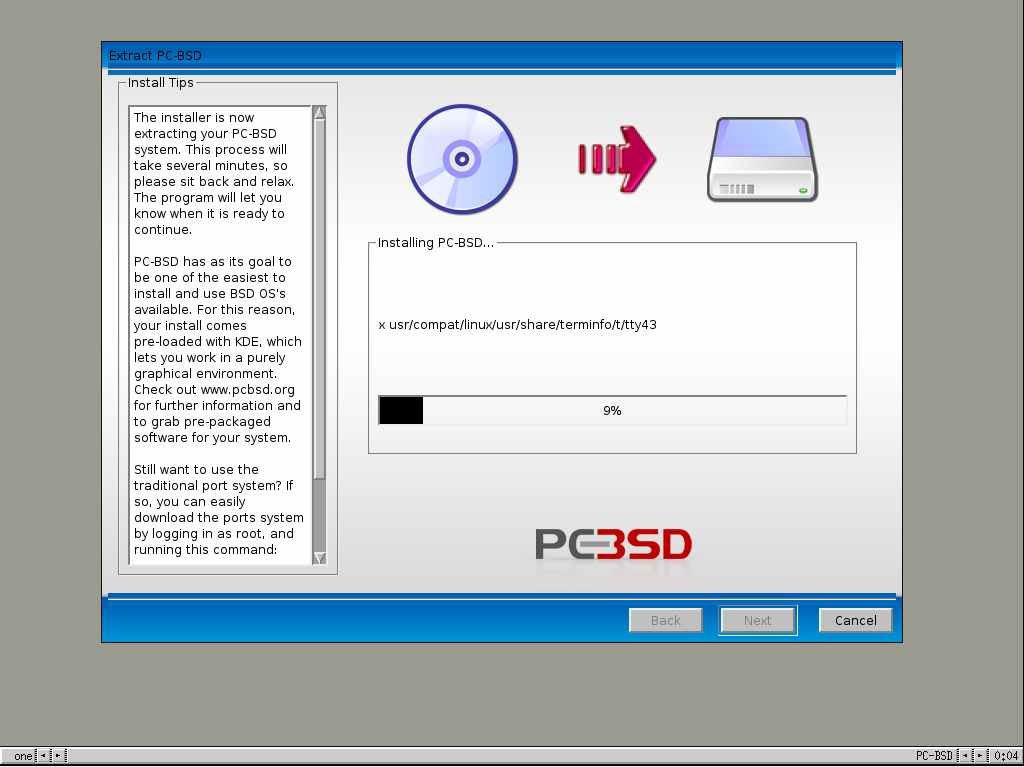
Recently, I downloaded the PC-BSD image from their website with an intention of trying out this Unix distribution. I booted my machine using the PC-BSD installation CD. And within a short time I was presented with a very beautiful and clean GUI installer. Actually, I found out that the PC-BSD developers have trodden the same path embraced by the Linux Live CD creators in that it first automatically detects and configures the interfaces and then puts the user in a fully usable desktop in this case the developers have used fluxbox (or is it blackbox?). And immediately after that, the graphical installer is started and the user is led through the installation process which, sans the partitioning, keyboard, locale and time configuration is really just copying all the files into the partition of ones choice. At the end of installation, I was placed into a fully configured KDE desktop system.

Fig: PC-BSD Installation in progress

Fig: System configuration dialog

If you have read my past article named Effective partitioning - The how and why of it, you will find that I already had a primary partition which housed the FreeBSD OS. So I was not faced with the prospects of creating a separate partition and chose to install PC-BSD in this partition. I installed the OS on a Pentium IV 2.0 Ghz machine with 256 MB RAM and having on board sound and all the hardware interfaces were detected automatically by the installer.

PC-BSD comes with the latest version of KDE - ver 3.5. Underneath, it is the same FreeBSD operating system. But what makes PC-BSD stand out is the effort that has been put to make it user friendly. For one, the hard working developers have provided GUI widgets to accomplish almost all common system administration tasks like user creation, network configuration and installing and uninstalling programs.

Fig: Configure your network with ease

Fig: GUI for installing and uninstalling programs


Fig: Update manager checks for updates.

Secondly, for installing and uninstalling software, PC-BSD has developed its own method which is similar to that found in Windows. That is, the software is packaged as a monolithic .pbi (pcbsd installer) file which has to be downloaded from their repository site. Once the .pbi file is downloaded, just double clicking on the file will open a GUI and guide the user through the installation process. Similarly, uninstalling is also a simple affair.

Fig: User manager makes creation of users quite simple

Advantages of PC-BSD
  • A very easy to use GUI enabled installation process unlike the text installer found in FreeBSD.
  • Is geared for the desktop user but with all the power, stability and security of FreeBSD. BTW, FreeBSD was around when Linux was not even born, which should give you a fair idea about this OS.
  • Installing and uninstalling software is a point - and - click affair and will gladden the hearts of neophytes and Windows users alike.
  • Bundles two FreeBSD kernels - a single processor kernel and a SMP enabled kernel. And the user can easily switch between the two (See system configuration dialog figure above).
Any drawbacks ?
  • One drawback I found was the limited amount of software available on their site. But I consider that as a temporary phenomenon and is bound to change in the future as they continuously add more software.
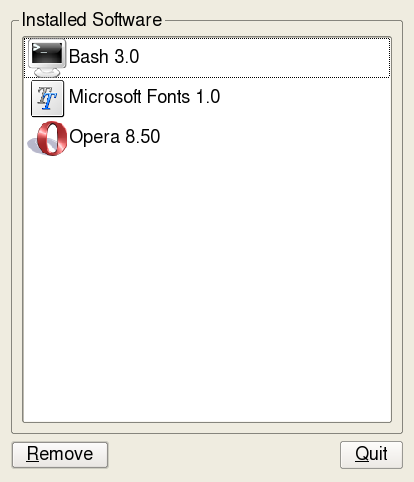
  • The GUI even though very clean and intutive at the present stage is not without its quirks. For example, I installed bash shell by the point and click method. But when I tried to change my default shell to bash from the User Manager widget (see figure above), the bash shell was not available for selection in the drop down box. And I had to do it the command line way. But I am sure such minor matters would be sorted out as more and more people try out PC-BSD.
  • Also some people talk about the obvious blot in installing software using PC-BSD click and install method because there is some duplication of the common libraries used by the various software.
    But seriously, for a person who has dedicated his full 80 GB hard disk or even half or quarter of that space for running PC-BSD, it is not a serious issue.
All in all, PC-BSD is an OS which has a bright future in the Desktop market provided the developers provide more variety of software or at least equivalent to those found in the FreeBSD ports.

Kamis, 02 Februari 2006

Bruce Peren's forcasts for 2006

I have been a Bruce Perens fan for quite some time now ever since a reader of one of my posts kindly pointed out to me the important part played by Mr Perens in the Open Source Movement. For those in the dark (like I was once), Bruce Perens is credited for creating the Open Source definition. But that is not all, he is also an active proponent, supporter and contributor to the open source movement.

So any forcasts coming from such an eminent person should be taken seriously. On his site, Bruce Perens provides five things that he believes will happen in the near future (by the end of 2006). In a nut shell, they are as follows:
  1. Java will be overshadowed by newer entries like Ruby on rails in the enterprise arena.
  2. Native Linux API will play a dominant role in the embedded market - especially in creating applications that run on cell phones.
  3. Cellular carriers (companies) will lose significance and will be just a means to an end. And customers will not be tied down to a particular cellular company.
  4. Feature phones will prosper only in cities where people overtly use mass transit and nowhere else.
  5. And lastly, Mr Perens feels that PHP will die a slow death.
There you have it - all 5 of them. A prediction from none less than a stalwart in the Open Source field.

Rabu, 01 Februari 2006

WINE vs Windows XP benchmarks

Wine is a recursive acronym for "WINE is not an Emulator" and is designed to run on Linux, software, which run natively only on windows. Specifically, Wine implements the Win32 API (Application Programming Interface) library calls thus one can do away with the Windows OS as such. In the past, I have successfully run Photoshop, MS Word and a few Windows games in Linux using Wine. At times, I have noticed a remarkable performance improvement while running a particular software using wine when compared to running it on windows. Now Tom Wickline has posted the results of the benchmark tests he carried out comparing Windows XP and Wine.

The results are rather interesting. Out of a total of 148 tests conducted, Wine leads in 67 tests which includes texture rendering, OpenGL, virus scanning, Memory tests and CPU test suite.

And not surprisingly, Wine lags behind Windows XP in the graphics test suite which uses DirectX instead of OpenGL.

If you are tech savvy and would like to see the finer details of the tests, then you should possibly read the benchmark details.