Rabu, 30 Agustus 2006

Transcript of talk with Richard .M. Stallman on the sidelines of 4th International GPLv3 Conference held at Bangalore

Various governments in the developing world are slowly but surely waking up to the advantages that free software can provide both in terms of monetary savings as well as otherwise. One example of this new way of thinking is the Kerala state government's decision to use Linux in all the government run schools in the state. In fact this trend is so prominent that even national dailies have started dedicating valuable column space for bringing the latest going ons in the free software community.

One example of such a leading Indian English language newspaper is "The Hindu" . This Indian national newspaper boasts of a readership of over 4.5 million and has cultivated an image of providing balanced and unbiased news. Recently they concluded a series of surveys about the social aspects and the aspirations of the Indian populace in association with CNN-IBN television channel (the Indian subsidiary of CNN). I am an avid reader of this leading Indian English daily.
Today when I came across the interview of Richard.M.Stallman on The Hindu, it left me with a warm and fuzzy feeling. So without further ado and completely pleading ignorance about any copyright issues, here is the transcript of the interview of Richard.M.Stallman as published in The Hindu newspaper dated August 31st 2006.

Transcript of the interview with RMS
Richard Stallman is the famous for his brushes with authority. In the 1970's at the Massachusetts Institute of Technology Artificial Intelligence Laboratory, he reset the system passwords to null strings because he didn't like restricted computer access. He went on to found the free software movement and the GNU Project, which saw him author the General Public Licence (GPL) that defined the four basic rights of computer users. A million programmers now reputedly contribute to free software. And now, after 15 years, GPL is ready for its next version, GPLv3. Stallman has drafted it with legal counsel from Eben Moglen, professor of law and history of law at Columbia University. Excerpts from an interview with Anand Sankar on the sidelines of the 4th International GPLv3 Conference held at Bangalore.

Q. What are the main changes in GPLv3 and why are they necessary ?

RMS: Various changes are proposed for various reasons, so there is no general reason. There are different kinds of reasons. First of all, some changes have to do with fighting against software patents. GPLv3 has an explicit patents licence and it has limited kind of patent retaliation. Consider if Company A is running a version of a GPL-covered program on which they have made improvements and they get a software patent for the technique that it will feature, and then someone else, B, makes similar improvements on that program, then A can't sue B. If they do, then they lose the right to continue maintaining that program. So it is a way in which we can prevent treachery to the community.

We have made the results of GPL as uniform as possible, independent of national copyright law variations. We have defined two new terms, propagate and convey, instead of copy and distribute.

Q. The new version takes DRM (Digital Rights Management) head on. India might also go ahead with an amendment to the Copyright Act of 1957. What consequences will it have ?

RMS: The media companies are trying to take total power over the public. They want to publish books, movies and music in formats that are encrypted and that are designed for the sole purpose of controlling the public. So their idea is that nobody should be allowed to or able to make a player, except with their approval.

The companies want to modify GPL-covered free software to restrict the user. The next thing they want to do is ensure we users cannot change the program again.

And this brings them in direct conflict with GNU GPL, which says you are free to change the program and redistribute it and the next person too has freedom to make the changes he wants to make.

Q. Do you feel that the Kerala (an Indian state) Government's decision to start using free software in schools is something that the rest of the country will follow ?

RMS: If you teach students to use proprietary software you are teaching them to be helplessly dependent on a particular company. And that is not good for society as a whole. So, the schools should not do it. What the Kerala government is doing is the right thing and all other states in India should be doing this.

Q. There are a lot of misconceptions about free software. What kind of an economic model does an entrepreneur look at when he starts out with free software ?

RMS: I want to ask you why that question is worth asking. First of all there are many people who don't have to make money. Importantly even if a person has to make a living, he doesn't have to make a living from everything he does.

Lots of people develop free software in their free time and there are people who have to make a living and they do make a living.

To jump from, this person is not rich and therefore has to work, to this person can't write free software because he is not paid to write it, is an error.

There are over a million contributors to free software, a substantial fraction is getting paid and a majority are volunteers.

I suspect the reason people bring up this question of economics as a secondary detail is because they are labouring under the misconception that the free software community is impossible, unless the developers are getting paid.

Q. Catering to local needs is a stated goal of free software but GPL itself has not been officially translated into local languages. Your comments.

RMS: We are trying to write the text in such a way that its results are as uniform as possible in all countries. And for the same reason, uniformity of results, we are not translating it. Every translation would be an opportunity to make a mistake. And any mistake could be a disaster. Free software must be written in English and the reason is it is the language understood by programmers around the world. Obviously to have that in other languages is a good thing. So, we have encouraged others to publish translations that are clearly marked unofficial and we link to them from our site. You can use it as a guide if you don't read English.

For more information on the GNU project visit gnu.org.

Update (2nd September 2006): A reader of this blog has kindly pointed out the online version of the interview (which I couldn't find earlier and hence the reason for this transcript) as well as another interview with RMS carried on the Financial Express (an Indian newspaper).
Ciaran O'Riordan points out to the transcript of the entire presentation (not the interview) given by Richard.M.Stallman at the 4th international GPLv3 conference held on 23rd August at Bangalore.

Minggu, 27 Agustus 2006

A Tryst with Debian Etch Beta 3

When a Linux enthusiast hears the name Debian, it never fails to instill in him some awe and respect. After all, this is the one and only not-for-profit Linux distribution which has singularly built up a name synonymous with security, stability and freeness.

I recently downloaded the latest offering of Debian which goes in the garb of Debian Etch Beta 3. Ironically, I came across the correct link through a comment inserted in a prominent news site (I will come back to it later). There are 19 ISO images to download if you want all the packages which runs to more than 17000 and their sources. But Debian also provides a net install CD image roughly around 140 MB size and is the preferred option for people who have a very fast Internet connection. And it is possible to install the distribution entirely via the net.

Since I was severely constrained in the Internet speed department, I decided to download the first CD image of size 643 MB praying that it would be enough to install a full fledged desktop environment. After a couple of hours, I had the ISO image successfully downloaded and burned on to the CD and I was ready to install Debian on my machine.

The main reason for trying out this version of Debian was to check out the new GUI installer which is considered to be a huge improvement over the previous versions. I booted my PC using the CD and I was shown a boot prompt. Here I had the choice of either installing using the text based installer or using the new graphical installer. Also it is possible to install the distribution using the expert mode or the normal mode. If you opt for the normal mode, the installer takes most of the decisions at the cost of your relinquishing fine grained control. Since I like having more control of the installation process, I opted for the expert GUI mode and diligently typed the command :
boot: expertgui
In fact, the installer provides a plethora of choices which one can learn about by navigating using the function keys F1 to F8 prior to entering the command.

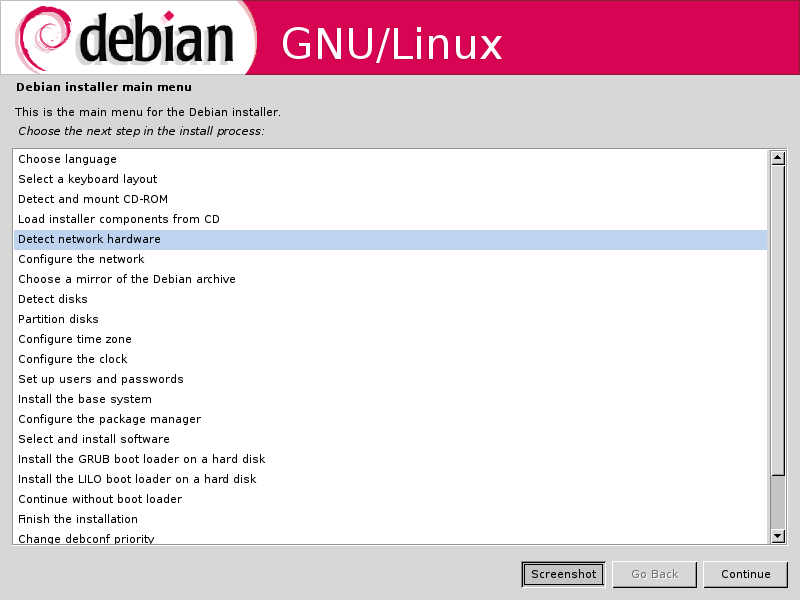
Fig: New GUI installer of Debian

In a short time, I was face to face with the new GUI installer which had a clean spartan look to it. The installer in itself has only three buttons. Them being "Continue", "Back" and "Screenshot". The "Screenshot" button will grab the current screen and save it as a PNG image in the /var/log/installer/ location which can be later accessed after the installation is complete. This imparts a nice touch to the whole process as it will, at a later time, aid in providing a visual walk-through of the installation steps to a first time user of Linux.

Debian Installation Walkthrough
The installation steps I had to go through are as follows :
  1. Choose language
    • Choose a country or region
    • Choose locale
  2. Select a keyboard layout
    • Type of keyboard
    • Keymap to use
  3. Detect & mount the CD-ROM
    • Modules to load - like usb-storage, floppy and so on.
    • Start PCMCIA ? Yes/No
  4. Load installer components from CD
  5. Detect network hardware - automatic detection
  6. Configure the network
    • DHCP or static IP
    • Set hostname
    • Set domain name
  7. Choose a mirror of the Debian archive
    • Choose the country
    • Choose ftp location
    • Enter any HTTP proxy information
  8. Detect disks - Automatic detection
  9. Partition Disks - Would be nice to have a help button here for first time users. For others the whole process is intuitive.
  10. Configure time zone
  11. Configure clock
  12. Setup users and passwords
    • Enable shadow passwords? Yes/No
    • Allow login as root ? Yes/No
    • Set root password
    • Create normal user account
  13. Install the base system
    • Select the kernel image - There are 20 images including those with SMP support for 2.4 and 2.6 kernels.
    • Select tools used to generate boot initrd
  14. Configure the package manager
    • Should the network mirror be chosen ? Yes/No
    • Use non-free software ? Yes/No - Really interesting!
  15. Select and install the software
    • Participate in Debian popularity contest ? Yes/No - Cool!
    • Select your choice of packages
      • Desktop environment
      • Web Server
      • Print Server
      • DNS Server
      • File Server
      • Mail Server
      • SQL Server
      • Laptop
      • Standard System
  16. Configure Exim v4 - Mail Transport Agent
  17. Choose dictionaries to use (US, GB...)
  18. Install Grub/Lilo Boot loader or continue without boot loader
  19. Finish the installation
Even though there are a lot of steps involved in the Expert mode of installation (the number of steps are a lot less if you choose the normal mode), each of them are easy to understand. I found the installer to provide fine grained control over which modules to enable.

Usually most Linux distributions enable all the modules available even though many of them are not needed for the particular machine hardware. But Debian allows one to enable just those modules that are most suited for the machine. For example, my machine does not have infrared or wireless supported hardware so I can choose not to load the kernel modules related to these.

Another aspect which endeared me to the Debian way of installing Linux was the sheer number of kernel images available to choose from. The installer provided a choice of no less than 20 kernel images from the 2.4 kernel fit for installing on a 486 machine to the 2.6 kernel with SMP support for Pentium class of x86 machines.

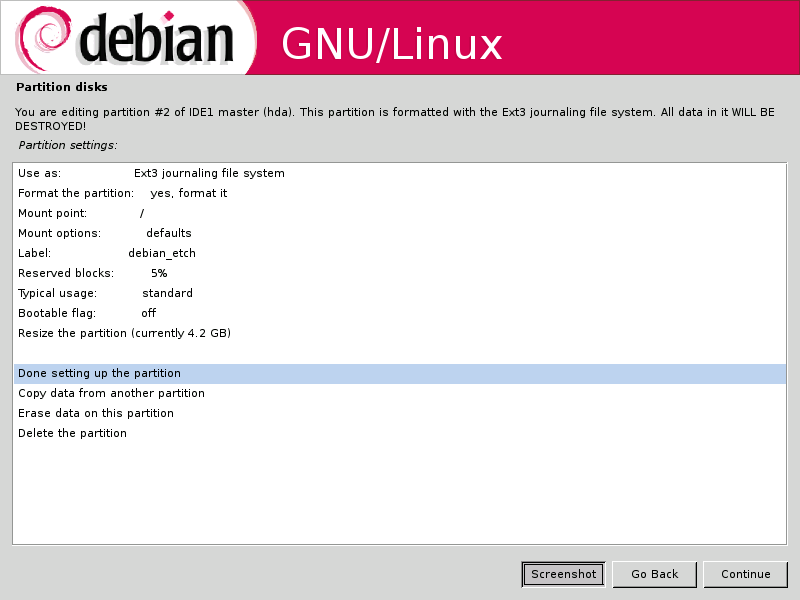
Fig: Partitioning the hard disk

The Grub boot loader also correctly detected the WindowsXP and Ubuntu 6.06 OSes residing on the other partitions on my machine though it failed to detect the FreeBSD OS. But then none of the other Linux distributions I have installed till now have correctly detected the FreeBSD OS while installing the boot loader.

If one has a net connection, I recommend choosing the standard system install (while installing the software) which will install a base system sans X server. And then it is only a matter of installing just those software which are needed using apt-get. I installed the standard system and then with an additional 150 MB download, I was able to setup a desktop system with an editor (GVim 7.0), a web browser (Firefox 1.5.0), a window manager Xfce 4.0 (a very good alternative to the more common heavy weights Gnome and KDE) and two graphics software Gimp 2.2 and Inkscape 0.44. It is clear that the Debian team have upgraded the Etch repositories to mirror the most recent versions of the software. For example, the Inkscape build was compiled as recently as July 2006.

And after all this, my Debian partition utilized only 1.1 GB space which includes the space used by apt-get for storing the packages downloaded for installing. I have started liking the Debian way of installing only what is necessary which does away with a lot of bloat. And I am sure this will be the preferred way of installing Linux in the future when majority of the people have access to high speed internet.

I found the new graphical installer similar to the text installer of FreeBSD in that it is possible to jump around back and forth in the different categories of the main menu. And once a particular task is finished, you are placed back in the main menu.

Bootup times of Debian
The boot-up times are significantly faster than any of the other Linux distributions I have used barring say Vector Linux or Gentoo which are also equally quick to boot up. I dare say I found Debian Etch to boot up quicker than Ubuntu :).

The Pros of Debian Etch beta 3
  • Comes with an easy to navigate graphical installer
  • Has a choice of 20 Linux kernels suitable for a wide variety of x86 machines.
  • Gives fine grained control over the installation with options to enable/disable specific modules.
  • Installs the latest versions of software. A real surprise!!
  • Quick boot up times.
  • Stable and secure - you get the same unadulterated operating system which powers many of the high traffic servers around the world.
  • Support for setting up encrypted partitions during installation .
The Cons of Debian Etch beta 3
  • Internet access is mandatory to install Debian unless you are willing to shell out money to buy a set of CDs.
  • No out of the box support for Flash, Sun's Java, proprietary audio formats, closed source graphics drivers and so on. And these have to be included by the users themselves.
Now for some rants ... ;-)
I had earlier noted that I got hold of the link to Debian Etch beta 3 from a prominent news site where a reader had graciously included it in his comment. Would I have succeeded in downloading the correct ISO (in my case the most recent one) if I had tried looking on the Debian website ? In all probability I would have ended up downloading the wrong version of Debian.

Agreed, Debian supports lots of architecture other than x86 and all these need to be given equal representation. But how much effort will it take to provide a download link to the latest version of Debian simultaneously recommending a specific version for desktop users (even if it is in beta stage) on the main page of debian.org site ? I would guess not much. The download link provided at present takes the visitor to Debian Sarge which is too outdated for use as a Desktop.

On this note, and with due respects, I feel Debian team seriously need to acquire some lessons in the ABC's of marketing. Just because it is a not-for-profit organisation doesn't mean that it has to refrain from marketing itself and rely exclusively on well wishers and enthusiasts to spread the word. It is high time that the Debian site is overhauled and made more user friendly (Read less cluttered) . For one, a new Linux user will not be able to make head or tail about Sarge, Etch or Sid. But if he is told which ISO image is most suited for a specific purpose, that will go a long way in making the end-user experience towards Debian much better.

I would love to see a forum hosted on the official site where users can post queries and help each other on Debian specific problems. If Debian has to regain the lost ground on the popularity front, then it has to take the desktop users (newbies ??) more seriously. While a system administrator is capable of taking care of problems he face with Debian himself, an ordinary user will need some directions. And Debian's capability in handling this section of users will decide how popular Debian gets in the coming future.

Having said all this, I eagerly await the final release of Debian Etch.

Jumat, 25 Agustus 2006

One Laptop Per Child gets a new name and a slightly higher price tag

From the time of its inception, the project of providing one Laptop per child has managed to catch my imagination. It is my belief that a computer will bring the best from within a child and will give growth to its imagination. The only hurdle of providing a computer to every child is the obvious cost factor. And this exciting project spearheaded by MIT could be the corner stone for change in the way children see learning.

Ars Technica writes that MIT one laptop per child project has finally got a name and will be known as Childrens Machine 1 (CM1). But the name is not the only aspect that has changed. The laptop will be scaled up to provide a 400Mhz AMD Geode processor, 128 MB of DRAM, built-in wireless support and 512 MB flash memory storage. The down side is that it is no longer the $100 laptop project as the price has climbed slightly to $140.

Those who keep track of this illustrious project will recall that this laptop is available for sale only to governments and only at a minimum order of 1 million pieces or more. OLPC team runs a wiki giving all the latest news about this project and the progress it is making in achieving its goal.

Rabu, 23 Agustus 2006

How to setup a home web server - the Red Hat way

In previous posts I have explained how to set up apache server to serve webpages on ones personal machine. But then I explained how to do it the Debian way. Obviously there are other ways of doing the same thing. For instance, if you put the same query (of setting up apache webserver) to a person running RedHat, the steps he will list out will be some what different from what I had covered. By now you will realise what I am getting to. There is obviously a Red Hat way of doing things and a Debian way of doing things.

In Debian based distributions, the apache webserver uses a modular structure of storing configuration information using different files for each site which makes it less cluttered. Where as in Red Hat, you have a single flat file called httpd.conf in which you add all the configuration details of each site.

Jeff Goldin has written an excellent article which explains the Red Hat way of setting up a home web server which makes a very interesting read. But apart from the minor differences, the article contains lots of information like the type of hardware to select, the partition scheme to use, increasing the level of security of the webserver and so on which I believe are important concepts which could be applied while hosting a web server in other Linux distributions too.

Senin, 21 Agustus 2006

Shouldn't this be reason enough to opt for an Open Source development model?

In a traditional software development model, the client asks for one thing and is delivered something else not to say anything about the galloping costs involved as is rightly illustrated by the cartoon below.

Fig : Traditional software development model (original link)

Shouldn't it be reason enough to take a long hard look at the development model of open source software instead of sticking to the traditional model of software development with its all too evident fallacies?

Disk Encryption Tools for Linux and benchmark result of a couple of them

Consider this scenario... Your computer running Linux somehow ran into a hardware glitch and had to be hauled to the neighborhood Computer service center. And you are asked to leave the machine at the service center and come back after a couple of days so that the technician can have a good look at it. But you are a bit worried because the harddisk contains the blue prints of the most secret project you are currently working on ;-) .

Ever been faced with such a situation where you have to contend with wringing your fingers in despair ? This is where the use of an encrypted file system gains prominence. If you had created an encrypted volume on your hard disk and were in the habit of saving all your sensitive data on to the encrypted volume, you could have had a sound sleep while your computer is being repaired at the service center.

In Linux there are a number of solutions to create encrypted volumes and encrypting and decrypting data on the fly. Some of them are as follows:

Qryptix - Qryptix consists of a PAM object and utilities for session- and key-management for encrypted home directories using the International Kernel (CryptoAPI) patches for Linux. It simplifies login/logout, mounting/unmounting, and key generation and changing. Unfortunately, it needs selinux to work properly. One OS which has selinux installed is Red Hat/Fedora.

eCryptfs - An enterprise-class cryptographic filesystem for Linux.The kernel module component of eCryptfs is upstream in the -mm tree of the Linux kernel.

Truecrypt - One of the best and easily available disk encryption solution for both Windows and Linux platform.

Encfs - EncFS provides an encrypted filesystem in user-space. It runs without any special permissions and uses the FUSE library and Linux kernel module to provide the filesystem interface.

LUKS - LUKS is the upcoming standard for Linux hard disk encryption. By providing a standard on-disk-format, it does not only facilitate compatibility among distributions, but also provide secure management of multiple user passwords. In contrast to existing solution, LUKS stores all setup necessary setup information in the partition header, enabling the user to transport or migrate his data seamlessly.

dm-crypt - Dm-crypt is a device mapper target which provides transparent encryption of block devices using the new Linux 2.6 cryptoapi.The user can basically specify one of the symmetric ciphers, a key (of any allowed size), an iv generation mode and then he can create a new block device in /dev. Writes to this device will be encrypted and reads decrypted. You can mount your filesystem on it as usual. But without the key you can't access your data.

CryptoFS - CryptoFS is a encrypted filesystem for Filesystem in Userspace (FUSE) and the Linux Userland FileSystem (LUFS).

Justin Korelc and Ed Tittel have done an interesting benchmark of three of the above encryption tools namely LUKS, EncFS and CryptoFS, and have posted their findings online. And their verdict is that LUKS shines over the other two in the ease of use department because of better integration with the Gnome desktop and PGP keyring management facilities.

Kamis, 17 Agustus 2006

Interview with Fedora Project Leader Mark Spevack

Fedora project leader Mark Spevack gave an interview to slashdot where he answers questions about Fedora and what significant part it will play in the future of Linux. He is asked about the worst aspect of Fedora, enabling NTFS support in future versions of Fedora, comparison of Fedora with Ubuntu and many other interesting questions which surprisingly, he tackles and answers in a very honest and clear manner. And when confronted with the problem faced by Linux on the closed source (propritery) drivers, his solution is to vote with your wallet. Buy only those hardware for which you have open source drivers readily available.

One grouse I have about Fedora is its crappy way of updating/installing software. In the past, when ever I tried installing software in Fedora using Yum, I have found it to take trible the time it takes an apt-get to install the same software in a Debian based distro. Of course it could have been a case of using the repository in the wrong geographic location. But still Yum cannot be compared with apt-get in efficient management of packages on one's system. Fortunately, there is a version of apt-get available for Fedora too.